
HOW TO PREPARE YOUR FILES

How to Prepare Print Files for DTF Printing

Preparing your artwork correctly is the most important step for flawless DTF (Direct-to-Film) transfers. At The Karya Quotient, we want your prints to look perfect—whether you're customizing T-shirts, branding merchandise, or ordering UV DTF stickers. This guide explains exactly how to prepare print files for DTF printing, including formats, resolutions, and common file mistakes to avoid.

Why File Preparation Matters

DTF printing is a precision-based digital process. Unlike screen printing, your file is printed exactly as it’s submitted. A clean, properly formatted file ensures:

✅ Sharper prints with vibrant colors

✅ Perfect edges (no weird halos or cut errors)

✅ Faster processing and quicker turnaround

✅ Better adhesion during heat pressing

Transparent Backgrounds vs. White Backgrounds

✔️ DO: Use a transparent background if your design should float on the fabric.
DON’T: Use a white square background unless it’s intentional.


If your file includes a background, make sure it’s part of the design. Otherwise, your transfer may include a white box around it.

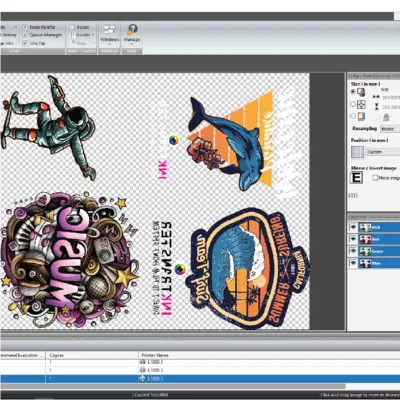
DTF PRINT FILE

Design Quality & Cleaning Tips

Before submitting your design:

  1. Check Edges: Zoom in 200–400% to inspect your outlines. Smooth edges = smooth transfers.

  2. Avoid Gradients That Fade to Transparent: These may not print correctly.

  3. Eliminate Hidden Layers or Masked Objects: Flatten all visible elements.

  4. Use Solid Fills Where Possible: DTF printers handle bold, flat colors beautifully.

  5. Think like a printer: every pixel is printed. What you see is what gets pressed.

Adjust image

File Format & Size Guidelines

To get the best results, follow these technical requirements when sending your design:

SettingRecommended ValueWhy It Matters
File TypePNG (preferred), PDF, or TIFFPNG allows transparent background and high quality
Resolution300 DPI (dots per inch)Ensures a crisp, high-definition print
Color ModeRGB (not CMYK)DTF printers work best with RGB color profiles
Canvas SizeMatch final print size + bleed if neededPrevents distortion or resizing issues
BackgroundTransparentAvoids accidental white boxes around artwork
Pro Tip: If using text, always flatten or outline fonts to prevent missing fonts during processing.

Best Practices for Apparel Transfers

For T-shirt printing and fabric branding:

  • Keep designs between 10–27cm wide, depending on placement

  • Leave at least 0.5 cm of margin around the edge

  • Avoid ultra-fine lines below 0.3mm—they may not transfer properly

  • Use bold contrast colors for black or dark fabric

If you’re unsure how your design will look, we offer mockups and proofs before final printing. Just ask!

Common Mistakes to Avoid

  • ❌ Low-res files from the internet (blurred or pixelated)

  • ❌ CMYK files (colors may shift)

  • ❌ Designs with hidden or locked layers

  • ❌ Flattened JPGs with white backgrounds

  • ❌ Text that isn’t outlined (fonts might not match)

Need help? Contact us and we’ll prepare your print file for you at no charge if you’re placing a confirmed order.

Shopping Cart